
Published • 2 Apr 2026
Adding more AI smart stores is usually the right move. More doors mean more assortment, better temperature control, and higher capacity. But once a location goes from one unit to several, a new problem tends to surface.
The store starts to feel fragmented.
Shoppers tap, shop, and check out. Then they tap again. And again. Each door works, but the experience feels broken up.
That's where VisionLink comes in.
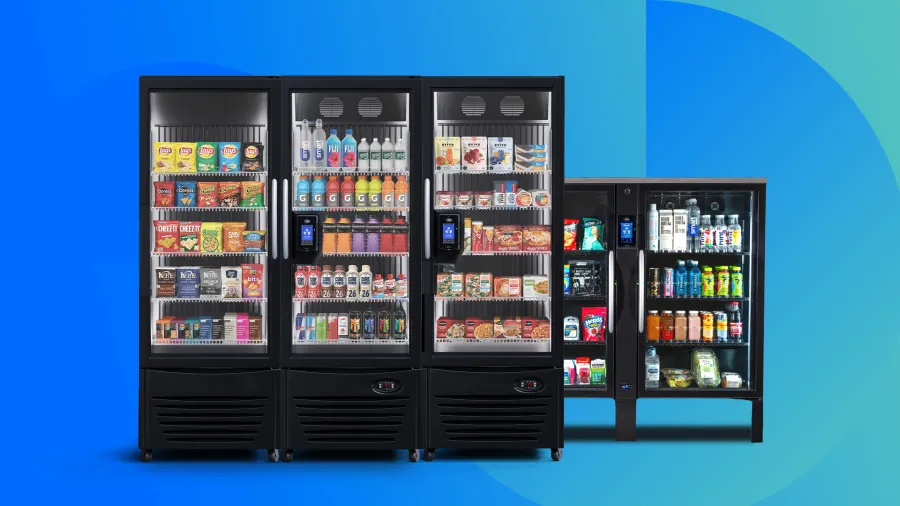
VisionLink is 365's Bankable Smart Store capability for Vision Smart Stores. It's designed to make multi-cooler locations behave like one cohesive store, without changing the physical layout or sacrificing control.
Where Multi-Door Smart Stores Start to Break Down
The friction doesn't come from adding doors. It comes from how those doors behave independently.
In a typical multi-cooler setup, each AI smart store runs its own transaction. That means every door creates a new pre-authorization and a separate receipt. For shoppers, this can feel repetitive and confusing. For operators, it often shows up as questions about pending charges, duplicate receipts, or hesitation to shop at more than one unit.
None of this is a failure of computer vision—it's a byproduct of scaling locations beyond a single device.
VisionLink was built to remove that friction without undoing the benefits of a multi-door layout.
What VisionLink Changes at a High Level
VisionLink changes the structure of the transaction, not the store.
Instead of treating each cooler or cabinet as a separate checkout, VisionLink creates a single shopping session that spans multiple Vision Smart Stores at the same location. That session becomes the thread that ties doors together.
The practical outcome is simple: shoppers move through the space seamlessly as if it were a single store, even though it's composed of multiple devices.
How VisionLink Works in Practice
From an operator standpoint, VisionLink is controlled entirely within 365's backend system, ADM.
VisionLink is enabled at the location level, not on individual devices. When it's turned on, all Vision (computer vision) devices at that location are linked together. Operators can include up to eight Vision Smart Stores in a single location and set a custom session duration, with a default of three minutes and a maximum of five.
Once a shopper starts a session, VisionLink handles the rest. The initial authorization is "banked" in the background and applied across the linked devices. The system recognizes the shopper as they move between doors and tracks all selections within that session window.
There's no change to the cooler hardware, cabinet layout, or physical placement—the behavior changes, not the equipment.
What the Shopper Experience Feels Like
From the shopper's perspective, VisionLink removes steps rather than adding new ones.
A shopper taps their card or app at the first AI smart cooler to unlock the door. A single pre-authorization is placed. If they want something from another cooler or cabinet, they grab the next door and keep shopping. VisionLink recognizes the active session, so there are no additional holds along the way.
When the session ends, all items are grouped into one transaction with one clear receipt. The shopper doesn't have to piece together multiple charges or wonder which door triggered which line item.
The experience feels continuous, which is exactly how most people expect a store to work.
What Operators Gain from VisionLink
For operators, VisionLink delivers benefits that go beyond shopper convenience.
With VisionLink, operators can:
- Encourage larger baskets across multiple Vision devices
- Support parallel shopping during peak periods
- Reduce payment-related questions tied to multiple holds
- Maintain cross-device promotions and bundles
Linking doors into a single session enables shoppers to move seamlessly between multiple doors with the same ease and confidence as an open market—encouraging larger basket sizes from impulse selections and bundled promotions set by operators.
VisionLink also supports parallel shopping, allowing multiple shoppers to run sessions at the same time. That matters during peak periods, when one-at-a-time access can limit throughput and slow sales.
On the support side, fewer pre-authorizations and fewer receipts help reduce confusion. When shoppers see one charge instead of several pending holds, there are fewer questions to resolve and fewer tickets to investigate.
Promotions and bundles continue to work across devices, so operators don't have to choose between merchandising flexibility and a smooth checkout flow.
Where VisionLink Fits Best
VisionLink is most impactful in environments where speed, clarity, and repeat usage matter.
Hospitality locations benefit from a cleaner guest experience and fewer payment questions reaching the front desk. Multifamily properties see smoother day-to-day use from residents who shop frequently and casually. Corporate breakrooms benefit from higher throughput during short peak windows. Travel and transportation settings benefit from speed and simplicity when time is limited.
Any location that relies on multiple Vision Smart Stores in close proximity can benefit from having them behave like one store instead of several.
Designing Multi-Door Stores That Behave Like One
Multi-cooler layouts aren't going away. They're becoming the norm as operators expand assortment and capacity. The challenge is making sure those locations still feel intuitive to shop and easy to manage.
VisionLink helps close that gap by turning multiple Vision Smart Stores into one connected experience. The result is a store that scales without feeling disjointed, for both shoppers and operators.
To learn whether VisionLink is the right fit for your next Vision Smart Store installation or refresh, talk to your 365 representative about enablement and planning steps.
VisionLink FAQs
What is VisionLink?
VisionLink is 365's Bankable Smart Store capability that links multiple Vision Smart Stores at a single location into one shopping session with a single pre-authorization and a single receipt.
How many Vision Smart Stores can be linked together?
Up to eight Vision Smart Store devices can be linked at one location using VisionLink.
Is VisionLink enabled per device or per location?
VisionLink is enabled at the location level in ADM. When it is turned on, all Vision (computer vision) devices at that location are linked together.
Can operators choose which devices are included?
No. VisionLink applies to all Vision Smart Store devices at a location. Devices cannot be selectively excluded.
How long does a VisionLink shopping session last?
Operators set the session duration in ADM. The default session length is three minutes, with a maximum of five minutes.
What payment methods are supported?
VisionLink supports:
- Credit and debit cards
- Digital wallets such as Apple Pay and Google Pay
- GMA
Does VisionLink work with promotions and bundles?
Yes. Promotions and bundled offers work across linked Vision devices within the same shopping session.
Can multiple shoppers use VisionLink at the same time?
Yes. VisionLink supports parallel shopping, allowing multiple shoppers to run sessions simultaneously at the same location.
Does VisionLink work on existing Vision Smart Store installations?
No. VisionLink requires S1U365 hardware and cannot be enabled on existing S1U devices. To see which device you currently have, please reach out to your rep!
Where is VisionLink available?
VisionLink is available in the United States only at launch.
Is age verification supported with VisionLink?
No. Age verification is not currently supported with VisionLink.